What's New
Introducing Media Library, backed by Obsidian notes properties with Bases. Manage your media content in a more organized way.
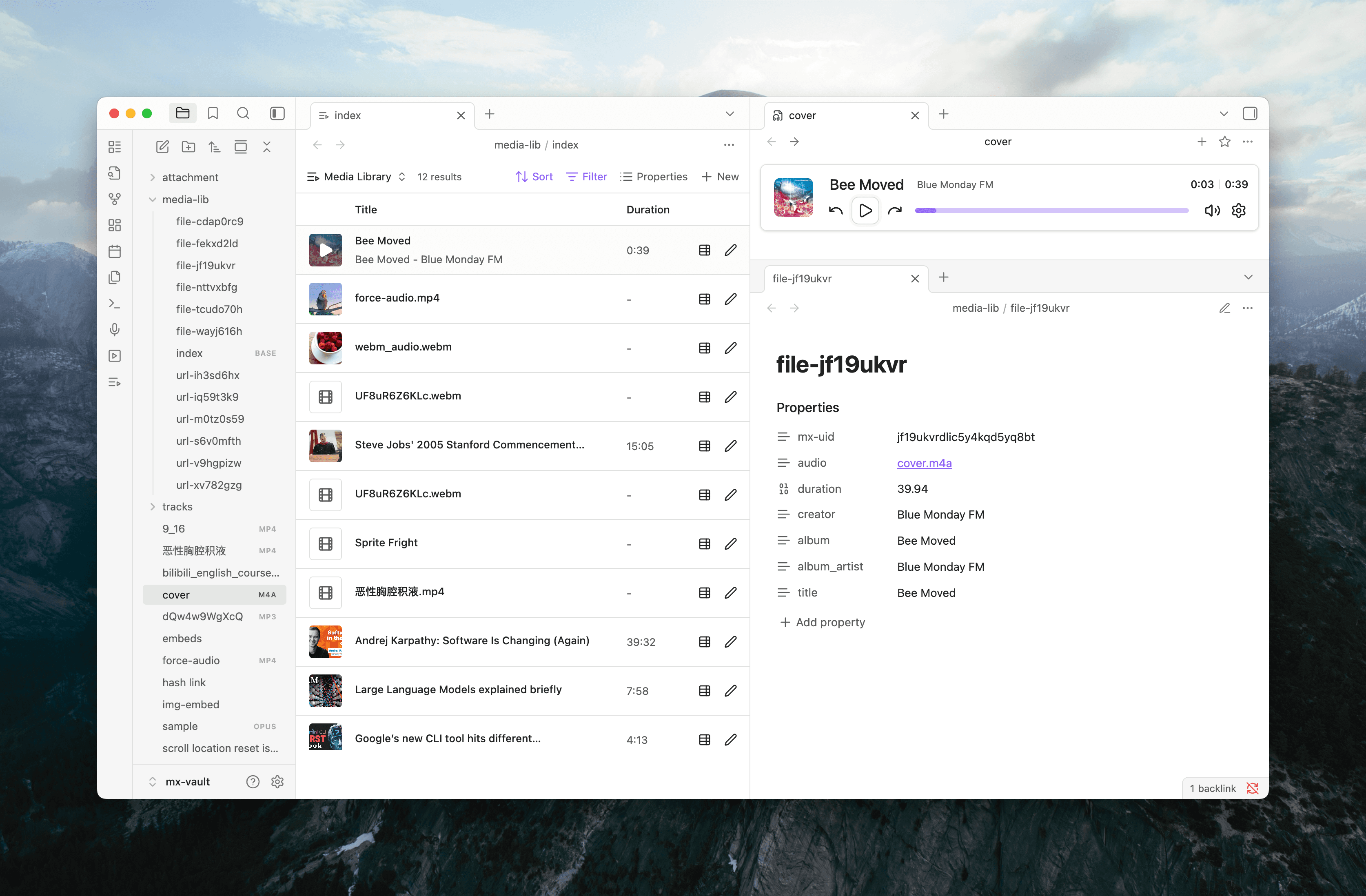
Media library view supports any bases file with mx-uid property included in query in obsidian v1.10.0 or higher. For more details, see Bases documentation.
- Media Library view: manage your media library content in Bases.
- Search, filter, and sort your media library by various properties, with cover art support.
- Import media by drag and drop, url input or file picker, media file metadata and cover will be populated automatically.
- Support local files, remote URLs, and media-hosting services like YouTube.
- Edit media metadata for playback settings using an interactive form. See frontmatter props for options available.
An index bases file is included under media library folder that include all media files in your vault by default. You can access it from ribbon button or command palette via command Open media library.
Metadata fetching from media-hosting services like YouTube is not supported yet. It will be included as part of optional online features in future releases.
To import existing media files in your vault to media library, you can run command Import existing media files in vault to library from command palette.
Bug Fixes
- Fixed screenshot saving folder creation handling (#524)